We have compiled a list of manufacturers, distributors, product information, reference prices, and rankings for CAD.
ipros is IPROS GMS IPROS One of the largest technical database sites in Japan that collects information on.

CAD(cam アプリ) - List of Manufacturers, Suppliers, Companies and Products | IPROS GMS

Last Updated: Aggregation Period:Jul 22, 2026~Aug 18, 2026
This ranking is based on the number of page views on our site.

CAD Product List

1~12 item / All 12 items

Displayed results

HANDY CAD MARK II

Faster! Easier! More accurately!

2D design and drafting are evolving daily with the designer's demands for "more simplicity and more efficiency." This is true across various fields, from beginners to professional use. HandyCAD Mark II liberates designers from daily stress with its long-cultivated know-how and refined usability, supporting new ideas from designers. It supports new concepts in manufacturing with its "intuitive operability"!

  • Other CAD
  • CAD

Added to bookmarks

Bookmarks list

Bookmark has been removed

Bookmarks list

You can't add any more bookmarks

By registering as a member, you can increase the number of bookmarks you can save and organize them with labels.

Free membership registration

CAD system "hyperCAD-S"

A CAD basic module suitable for the starting point. Handling geometric elements is very easy even in the subsequent CAM operations.

"hyperCAD-S" is a CAD software that fully utilizes the capabilities of hardware systems to create digital processing data. The advanced ultra-high-performance 64-bit system is a perfect solution that can correctly handle many issues that arise daily in the process of creating precise products and parts by manipulating meshes, faces, and solids. Additionally, it can prepare large amounts of imported data quickly, easily, and safely for later NC programming, and this processing can be executed without relying on the original CAD system at all. 【Features】 ■ Customizable filter functions ■ Intelligent geometric element management ■ Smooth data transfer ■ Intuitive operability ■ Support for all languages *For more details, please refer to the PDF materials or feel free to contact us.

Added to bookmarks

Bookmarks list

Bookmark has been removed

Bookmarks list

You can't add any more bookmarks

By registering as a member, you can increase the number of bookmarks you can save and organize them with labels.

Free membership registration

Hybrid CAD System CADSUPER2025

Create value-added drawings with barcodes for product management! CADSUPER2025

In CADSUPER 2025, we have enhanced the "Barcode Command" for creating barcodes and QR codes for product management, the "Layer Name Import/Export Function" for outputting and modifying layer names to external files and re-importing them, the "Image Display Function" that clearly shows the results of modified dimension attributes, and the "PDF File Compression Function" for outputting drawings to PDF. Main Features of CADSUPER 2025: 1. Barcode Command (Optional) 2. Layer Name Import/Export Function 3. Image Display of Dimension Attributes 4. Default File Name Settings 5. Image Settings for Printer/Plotter Output For detailed materials and demos, please contact: Marble Co., Ltd. Embedded Products Division, Product Business Department Phone: (03) 3419-6011

Added to bookmarks

Bookmarks list

Bookmark has been removed

Bookmarks list

You can't add any more bookmarks

By registering as a member, you can increase the number of bookmarks you can save and organize them with labels.

Free membership registration

Hybrid modeling specialized 3D CAD 'ThinkDesign'

An innovative design approach, Target-Driven Design, directly connects completion to product strength, fulfilling such dreams of designers.

"ThinkDesign," an integrated 2D and 3D CAD, is a parametric CAD specialized in hybrid modeling such as solids, surfaces, and meshes. It has features that cover all stages of the design process, allowing for the elimination of barriers during information exchange at various stages of product definition, enabling rapid product development. In particular, its unique GSM (Global Modeling) function allows for the quick, easy, and accurate creation, modification, and verification of any shape. ◯ Recommended for companies that: ■ Want to implement an easy-to-use integrated 2D and 3D CAD ■ Want to introduce a CAD with excellent surface capabilities ■ Want to perform deformations considering factors like springback in press molds in a short time ■ Want to create meshes for reverse engineering from measurement meshes or for 3D printers *For more details, please refer to the PDF document or feel free to contact us.

  • 3D CAD
  • Other CAD related software
  • CAD

Added to bookmarks

Bookmarks list

Bookmark has been removed

Bookmarks list

You can't add any more bookmarks

By registering as a member, you can increase the number of bookmarks you can save and organize them with labels.

Free membership registration

[User Case] 3D Design CAD System - Household Appliance Design

Achieving shorter delivery times for high-quality products through the digitalization of the development process!

Solid Edge is a mid-range 3D CAD system developed and provided by Siemens PLM Software, a leading company in the PLM (Product Lifecycle Management) software industry, which achieves top-class operability. Esmaltec, a Brazilian manufacturer of household appliances such as washing machines and gas stoves, utilized Solid Edge to reduce prototype production by 40%. Furthermore, design rework was reduced by 80%! By implementing a development platform combined with Teamcenter, they achieved a 90% reduction in mid-project changes. For more details, please download the catalog or contact us.

  • Company:TAC
  • Price:Other
  • 3D CAD
  • CAD

Added to bookmarks

Bookmarks list

Bookmark has been removed

Bookmarks list

You can't add any more bookmarks

By registering as a member, you can increase the number of bookmarks you can save and organize them with labels.

Free membership registration

[User Case] 3D Design CAD System - Development of Radar Equipment

The defect repair work on the surface that took hours was completed in just a few minutes!

Solid Edge is a mid-range 3D CAD system developed and provided by Siemens PLM Software, a leading company in the PLM (Product Lifecycle Management) software industry, achieving top-class operability. SDL (Space Dynamics Laboratory), a cutting-edge research and development organization supporting the U.S. aerospace industry with over 30 years of history and achievements, also utilizes Solid Edge. In their radar equipment, 30 improvements have been made by leveraging Solid Edge's synchronous technology. Moreover, the time required to correct surface defects (gaps), which previously took hours, has been reduced to just a few minutes. For more details, please download the catalog or contact us.

  • Company:TAC
  • Price:Other
  • 3D CAD
  • CAD

Added to bookmarks

Bookmarks list

Bookmark has been removed

Bookmarks list

You can't add any more bookmarks

By registering as a member, you can increase the number of bookmarks you can save and organize them with labels.

Free membership registration

ThinkDesign 【3D CAD with excellent freeform surface capabilities】

Achieving high-quality reverse engineering through full hybrid modeling.

"ThinkDesign" is a hybrid 3D CAD that allows designers to create 3D models exactly as they envision. With the innovative design approach "Target-Driven Design," users can create freeform 3D models without complex operations or mathematical knowledge. The hybrid 3D modeling environment that merges surfaces and solids is exceptionally effective for creating and editing product shapes. ThinkDesign is utilized for various applications, including the creation of high-quality curved 3D models, generating CAD models from scan data, deforming 3D models that include meshes, automatic deformation prediction for press molds, and countermeasures for springback.

  • Other CAD
  • 3D CAD
  • CAD

Added to bookmarks

Bookmarks list

Bookmark has been removed

Bookmarks list

You can't add any more bookmarks

By registering as a member, you can increase the number of bookmarks you can save and organize them with labels.

Free membership registration

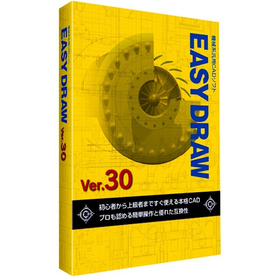
EASYDRAW Ver30 for Automotive Design

A genuine 2D CAD that can be used from the day of purchase!

In the field of automotive design, precise drawing creation and quick responses to design changes are required. Particularly in automotive design, which involves a large number of parts, managing drawings and tracking change histories are crucial. Errors in drawings or missed changes can lead to problems in the manufacturing process and increased costs. EASYDRAW Ver.30 is equipped with features for editing large drawings and comparing drawings, enhancing design efficiency. 【Usage Scenarios】 - Design of automotive parts - Body design - Drawing comparison during design changes 【Benefits of Implementation】 - Reduction in design time - Decrease in design errors - Cost savings

Added to bookmarks

Bookmarks list

Bookmark has been removed

Bookmarks list

You can't add any more bookmarks

By registering as a member, you can increase the number of bookmarks you can save and organize them with labels.

Free membership registration

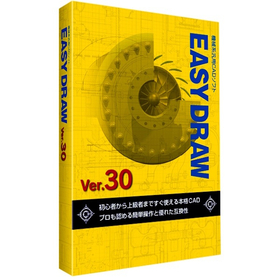
EASYDRAW Ver30 for Home Appliance Enclosures

A professional 2D CAD that you can use from the day you purchase it!

In the design of home appliance enclosures, the complexity of design is increasing due to the miniaturization and enhancement of product functionality. Changes in the enclosure design have a significant impact on the overall design and functionality of the product, necessitating accurate and efficient CAD software. EASYDRAW Ver.30 is equipped with features for comparing drawings before and after design changes, as well as the ability to read PDF drawings, thereby improving design efficiency. 【Usage Scenarios】 - Design of home appliance enclosures - Comparison of drawings during design changes - Utilization of PDF drawings 【Benefits of Implementation】 - Reduction in design time - Decrease in design errors - Improvement in design quality

Added to bookmarks

Bookmarks list

Bookmark has been removed

Bookmarks list

You can't add any more bookmarks

By registering as a member, you can increase the number of bookmarks you can save and organize them with labels.

Free membership registration

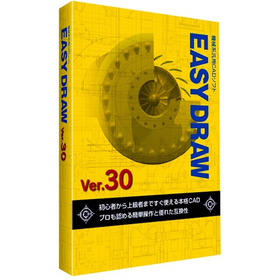
[EASYDRAW for Shipbuilding] Ver30

Streamline drawing creation! 2D CAD that meets the needs of the shipbuilding industry.

In the shipbuilding industry, it is essential to create accurate and efficient design drawings for complex structures. In particular, precision in details such as hull strength calculations and the arrangement of outfitting is crucial. Errors in drawings can lead to rework during the manufacturing process and increased costs. EASYDRAW Ver.30 is equipped with features for editing large drawings and reading PDF drawings, supporting the efficiency of drawing creation in the shipbuilding industry. 【Usage Scenarios】 - Creation of hull structure drawings - Creation of outfitting arrangement drawings - Modification and changes to drawings 【Benefits of Implementation】 - Reduction in drawing creation time - Decrease in design errors - Cost savings

Added to bookmarks

Bookmarks list

Bookmark has been removed

Bookmarks list

You can't add any more bookmarks

By registering as a member, you can increase the number of bookmarks you can save and organize them with labels.

Free membership registration

Aerospace Version 30 EASYDRAW

Streamline your analysis work with 2D CAD that you can use from the day of purchase!

In the aerospace industry, the analysis tasks require accuracy and efficient utilization of design data. Particularly in aircraft design and component strength analysis, the compatibility of CAD data and ease of editing are crucial. If data conversion between different CAD systems or editing complex shapes takes too much time, it can lead to delays and errors in analysis. EASYDRAW Ver.30 is equipped with a PDF drawing import function, allowing it to read drawings output from widely used CAD systems in the CAD industry. This supports effective utilization of design data and improves the efficiency of analysis tasks. 【Usage Scenarios】 * Creation of aircraft design drawings * Strength analysis of components * Ensuring compatibility of CAD data * Drawing modification tasks 【Benefits of Implementation】 * Increased efficiency of analysis tasks * Reduction of design errors * Cost savings * Improved data compatibility

Added to bookmarks

Bookmarks list

Bookmark has been removed

Bookmarks list

You can't add any more bookmarks

By registering as a member, you can increase the number of bookmarks you can save and organize them with labels.

Free membership registration

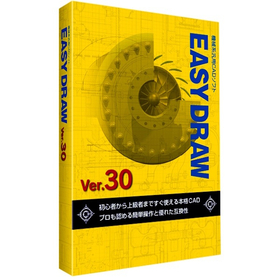
EASYDRAW Ver30 for Semiconductor Manufacturing Equipment

Strongly supports the layout design of semiconductor manufacturing equipment!

In the semiconductor manufacturing equipment industry, the miniaturization and high density of devices are progressing, making the accuracy of layout design crucial. In particular, optimizing component placement, securing wiring paths, and conducting interference checks are required within limited space. EASYDRAW Ver.30 addresses these challenges by providing large-capacity drawing editing, drawing comparison functions, and PDF drawing import capabilities, thereby supporting efficient and accurate layout design. 【Usage Scenarios】 * Layout design for semiconductor manufacturing equipment * Consideration of component placement * Design of wiring paths * Drawing revisions and change management 【Benefits of Implementation】 * Reduction in design time * Decrease in design errors * Cost savings * Improvement in design quality

Added to bookmarks

Bookmarks list

Bookmark has been removed

Bookmarks list

You can't add any more bookmarks

By registering as a member, you can increase the number of bookmarks you can save and organize them with labels.

Free membership registration